
Choose the dypt plan that fits how much you use it
dypt has three plans: Starter, Pro and VIP. Starter is designed for personal use, Pro gives you more room and more AI actions, and VIP is for heavier use or larger collaboration needs.
Premium plans
Plan comparison
| Feature | Starter | Pro | VIP |
|---|---|---|---|
| Tasks | 100 | 5,000 | 25,000 |
| AI actions | 25 per month | 200 per month | 500 per month |
| Public sharing | Yes | Yes | Yes |
| Private sharing | 1 other person per task | Up to 5 people total, including you | Up to 20 people total, including you |
| Repeating tasks | Included | Included | Included |
| Email reports | Weekly | Weekly and daily | Weekly and daily |
Starter
Starter gives you the core dypt experience: hierarchical tasks, deadlines, reminders, priorities, calendar views, time tracking, repeating tasks, weekly email reports and AI actions.
Starter also includes sharing. You can share tasks publicly with a link, and you can privately share a task with 1 other person. The person you share with does not need a paid plan.
Pro
dypt Pro is for people who use dypt regularly and need more capacity.
- 5,000 tasks - more room for larger task hierarchies, projects and long-running workflows.
- 200 AI actions per month - more AI usage across breakdowns, estimates, image-to-task, note cleanup and note extraction.
- Private task sharing - collaborate with up to 5 people in total on a task, including you. That means you can invite up to 4 other people per task.
- Daily email reports - get a daily summary covering tasks due today, overdue work and priority items, in addition to the weekly report included in Starter.
VIP

dypt VIP is for heavier use, larger task collections, or tasks that need to be shared with more people.
- 25,000 tasks - the highest task limit for complex systems, long-running planning, or power users.
- 500 AI actions per month - the highest AI action allowance.
- Private task sharing - collaborate with up to 20 people in total on a task, including you. That means you can invite up to 19 other people per task.
- Daily email reports - the same daily report feature as Pro, alongside the weekly report.
Repeating tasks
There is no separate repeating task allowance on any plan. Repeating tasks are available across dypt, and each task created by a repeat counts towards your plan's task limit.
Pricing
Check the pricing page for current prices. Annual subscriptions are discounted compared with paying monthly.
If you're not happy with your purchase, we offer a 14 day refund policy.
Managing your plan
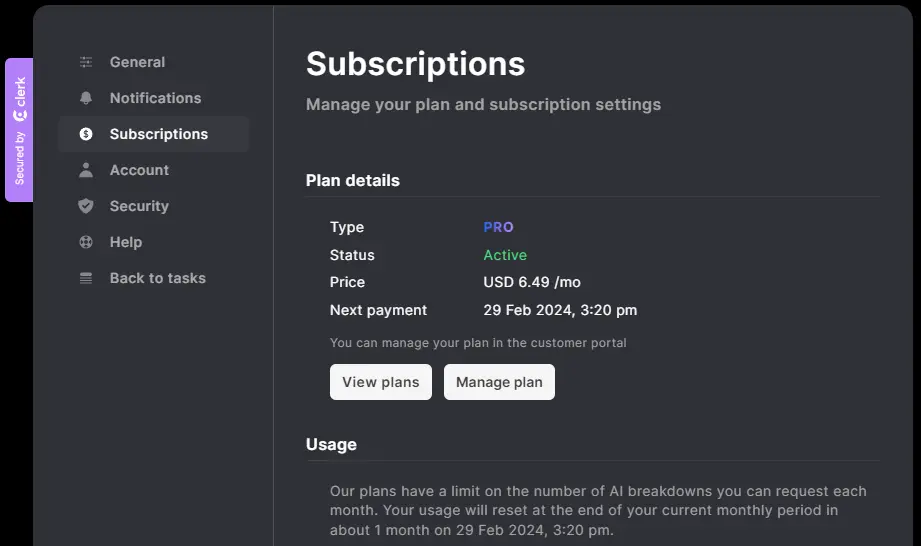
We aim to make it as easy as possible to manage your plan, so you can focus on getting the most out of dypt with the minimum of fuss.
Upgrade
New users
If you've not yet joined dypt, once you've signed up you'll be able to choose a plan to subscribe to.
Simply choose the plan that's right for you, and you'll be able to start using the premium features straight away once your payment has been processed.
Existing users
If you're already a dypt user, you can upgrade your plan at any time by visiting the subscriptions page and selecting 'Manage plan'.
In the customer portal, select 'Update plan', select the plan you'd like and follow the instructions.
Your new features are available immediately after upgrading.
Downgrade
You can downgrade your plan at any time by visiting the subscriptions page and selecting 'Manage plan'.
In the customer portal, select 'Update plan', select the plan you'd like and follow the instructions.
When downgrading, your current features remain active until the end of your billing period. If you have more tasks than your new plan allows, your existing tasks remain accessible, but you will need to delete tasks or upgrade again before you can create more.
Change your billing period
You can change your billing period, for example from monthly to annual, by visiting the subscriptions page and selecting 'Manage plan', then 'Update plan'.
Select from the 'Monthly' or 'Yearly' buttons at the top of the page to choose your new billing period. You can then select either the same plan or a different plan, and follow the instructions.
Follow the billing portal instructions to confirm the change. If the change affects your price, Stripe will show the billing impact before you confirm.
Cancel
You can cancel your subscription at any time by visiting the subscriptions page and selecting 'Manage plan'.
In the customer portal, select 'Cancel subscription' and follow the instructions.
When you cancel your subscription, the cancellation will take effect at the end of your current billing period. This means you will continue to have access to the premium features until the end of your current billing period. You will not be charged again.
At the end of your current billing period, your subscription will end and your account will move to Starter. Your tasks are not deleted.
Reactivate
Still within your billing period
If you've previously cancelled your subscription, you can reactivate it at any time by visiting the subscriptions page and selecting 'Manage plan' and then pressing renew. Your payments will continue as normal.
After your billing period has ended
Simply select a new plan to continue using dypt.
Update your payment method
You can update your payment method at any time by visiting the subscriptions page and selecting 'Manage plan'.
In the customer portal, press the edit button next to your payment method and follow the instructions.
Getting help
If you need any help at all with your subscription, please contact us and we'll be happy to help.